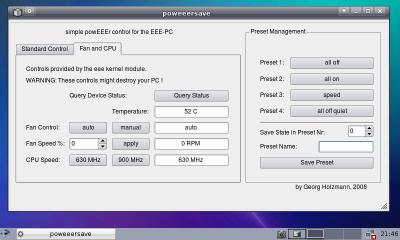
This is a small python/pyqt4 GUI progam to control various settings to save power on the Asus EEE-PC.
At the moment one can control and query the status of the camera, sound, wlan, lan, usb 1.1, fan and the cpu. All settings can be stored in presets, in example for battery, high-performance, low-power mode and etc.
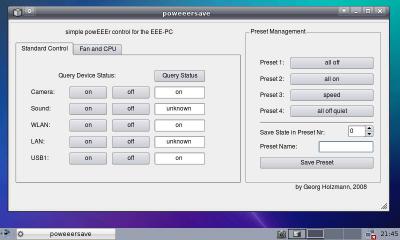
Usage:
Simply start the script poweeersave, then you will be asked for your root password. The program is not constantly querying the status of all your hardware, therefore if you want to update the current status you have to click on the button "Query Status". The presets are stored in the file "HOME/.config/grh.mur.at/poweeersave.conf", where HOME is usually "/root", because you need to run the program as superuser.
Development:
The program is written in python with pyqt4 and QtDesigner. You can open the file src/poweeersave.ui in QtDesigner to change the GUI. All commands which access hardware information are in the file src/commands.py and the logic in src/poweeersave.py. Any contribution is highly appreciated !


Linux eee pc
Hi,
Could ,you please tell me what version of linux you are using on your eee pc?
Love your powEEErsave btw!
Grtz,
Sweet
easy peasy
Hey Sweet!
My distro on the EEE pc is easy peasy: http://www.geteasypeasy.com/
(or did you mean the version of the linux kernel ?)
But it should work on any distro, where you can install pyqt ...
LG
Georg
So to run this, we should
So to run this, we should search for and install the python-qt4 package? (Linux newbie here.) Thanks for your help!
You need to have the
You need to have the python-qt4 and gksu package installed:
'sudo apt-get install python-qt4 gksu'
Additionally if you want to control CPU and Fan speed you will
need the eee.ko kernel module as exaplained in the wiki:
http://wiki.eeeuser.com/howto:overclockfsb !
ACPI Webcam
I am very excited about your Poweeersave script, however I am running Easy Peasy 1.1 on ubuntu 8.10 for a EEE 901 and the script is complaining about the fact that camera and wlan do not exist in the ACPI folder. Could you help me get this working?
Thanks! and Awesome program otherwise.
I only used this program on
I only used this program on an EEE 701, so it can be that the modules are called different on an EEE 901 ...
Look into the file src/commands.py - there are all the commands. You can adjust them there to your system.
Thanks So much just the tool
Thanks So much just the tool i was needing for, because the last i used has not capability to store presets.
Allungare il pene
Post new comment